Changelog

What shipped, when, and what it changed. Each version is a tagged release of Magpie’s engine, listed with the desktop work built on it.

  • v0.1.31 latest
  • 32 releases in 22 days
  • since 2026-09-19
  • desktop update check
  • once a day
  • opt-in
  • tells you, never installs
RSS feed of every release

Or let the app check once a day and tell you.

Filter by tag
  1. v0.1.31

    • Feature
    • Fix
    • Performance
    • Desktop

      Forget a research run

      • Forget deletes the page text a research run stored, every copy of it, and keeps what the run cost in your spend history.
      • A refused forget says why, and a run being forgotten can’t be resumed halfway.
    • Core

      Deleting a research run is all or nothing

      • Every stored copy of the pages a run read is purged in one step, which either finishes or changes nothing.
    • Desktop

      Plans and licence keys

      • Settings → Plan shows your trial or plan and activates a licence key. A key works on one computer at a time.
      • When a trial runs out the app turns read-only: everything you stored stays, and new runs wait for a key.
    • Desktop

      Screens that say what they mean

      • Errors read as sentences, dates use one format, and History’s day filter follows your local day.
      • Research says why it can’t start, and five squeezed layouts were fixed.
    • Desktop

      Keyboard and screen-reader fixes

      • Esc closes the innermost dialog, every toggle says whether it’s on, and the command palette is a real combobox.
      • Ctrl+1…9 follow key position, so they work on any keyboard layout.
    • Desktop

      Results repaint faster

      • Rendered markdown is kept between repaints instead of being rebuilt, and images in it show as their alt text.
  2. v0.1.30

    • Feature
    • Fix
    • Breaking
    • Core

      New installs keep data in the app-data folder

      • A fresh install keeps its store in the OS app-data folder instead of ~/.cache.
      • An existing ~/.cache/magpie store is still used, and never moved.
    • Core

      Browser rendering uses the Chrome or Edge you have

      • An installed Chrome, Chromium or Edge is launched before Magpie downloads a browser of its own. Snap builds are skipped.
    • Desktop

      Logging in uses your browser too

      • Capturing a login for a saved session opens your installed Chrome or Edge first.
    • Core

      The engine is AGPL-3.0 or commercial

      • The engine’s licence moved from MIT to AGPL-3.0-or-later, with a commercial licence beside it. The desktop app is built under the commercial one.
    • Desktop

      Research can read pages behind your login

      • Read with my login attaches a session you saved, checks it before the run starts, and marks every page it read as you.
      • The first opt-in for each site asks you to confirm, with focus on Cancel, so a stray Enter can’t agree for you.
    • Desktop

      The MCP server asks for a token by default

      • The first start mints a bearer token; turning it off is an opt-out the app remembers.
      • Breaking — an agent set up without a token needs it added.
    • Desktop

      Safer exports and snippets

      • CSV exports defuse spreadsheet formulas: a cell that starts with =, +, - or @ opens as text.
      • Copy as… prints typed text as (redacted) in its CLI, MCP and Go snippets.
  3. v0.1.29

    • Feature
    • Fix
    • Breaking
    • Desktop

      Signed installers for Windows and macOS

      • The release pipeline signs and notarizes the macOS app and its DMG, and signs the Windows app, uninstaller and installer.
      • Each build ships with SHA256SUMS, and the pipeline refuses to put an unsigned build on sale.
    • Desktop

      An update check that only tells you

      • Once a day, if you allow it, the app asks whether a newer version exists and shows a banner. It never installs anything itself.
      • Settings → About has the switch and a Check now button.
    • Desktop

      Logs, crash reports and notices

      • Magpie keeps a log file and crash output, reports startup problems in a dialog, and opens the log folder from Settings → About.
      • About lists the third-party notices, and every installer carries the EULA you accept at first run.
    • Desktop

      Cancel a running scrape

      • Cancel takes the Scrape button’s place while a scrape runs, and stops it at once.
      • A failed extraction keeps the page it fetched, with an Extraction failed banner and a way to Settings when a key is missing.
    • Core

      Failures keep what they finished

      • A failed extraction returns the page, a cancelled scrape is interrupted rather than failed, and an aborted crawl keeps its counts.
      • Watch checks no longer count as runs in history lists, and DuckDuckGo ads are dropped from search results.
    • Core

      Keys reach only their own vendor

      • The generic key and --api-key go to LLM providers only, and SerpAPI’s key never appears in an error.
      • Breaking — a search engine that took the generic key needs its own now.
    • Core

      The browser refuses proxies it can’t use

      • An authenticated proxy, or a per-run proxy on the browser path, fails up front with a proxy error.
  4. v0.1.28

    • Fix
    • Core

      Every run finishes its history row

      • A crawl that dies no longer stays marked running, and config writes are atomic, so an interrupted save can’t leave half a file.
    • Core

      Watches and costs stay honest

      • A watch change too large to diff starts a fresh baseline instead of failing every check after it.
      • A model missing from the price table still gets a cost on its runs.
    • Core

      Schemas can’t reach the network

      • A JSON Schema that points at an external $ref is refused, and the error shows how to inline it under $defs.
  5. v0.1.27

    • Feature
    • Fix
    • Core

      Research can read pages behind a login

      • A research job can attach saved sessions for the sites you name. Logged-in reads are throttled, and public reads still follow robots.txt.
    • Core

      Browser rendering honours the private-address guard

      • The entry URL and every document request on the browser path, redirects included, pass the same check as a plain fetch.
      • Each browser session removes its temporary profile when it closes.
  6. v0.1.26

    • Feature
    • Fix
    • Performance
    • Desktop

      Research reports you can audit

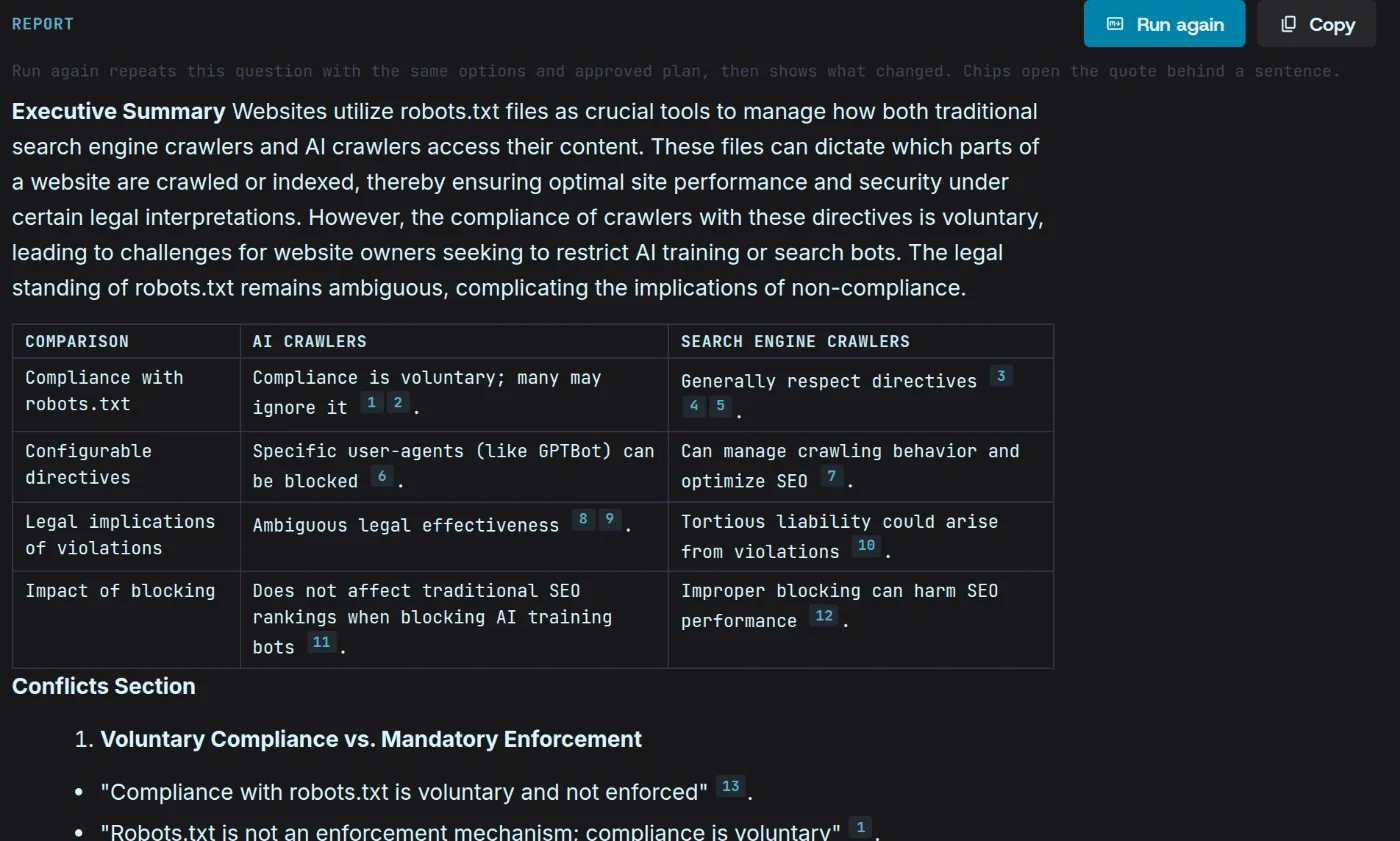
      • Every sentence carries chips for the facts behind it. Open one to read the pinned passage it came from.
      • Export the report as Markdown and its sources as CSV or BibTeX, or run it again and see what changed in the evidence.
      A Magpie report on how sites use robots.txt against AI crawlers: an executive summary and a comparison table of AI and search-engine crawlers, each claim tagged with numbered source chips.
    • Desktop

      Review the plan before research starts

      • A run waits at its plan: approve it, or ask for a fresh draft with a note, up to three times.
      • Copy as… gives the same run as a CLI command, an MCP call or Go.
    • Core

      Research checks a question before it runs

      • Every surface refuses a question the same way before anything is fetched — a missing key, no search backend, a bad effort setting.
    • Desktop

      Links can’t escape the app

      • Links in scraped content open in your system browser, and only plain http(s) addresses become links at all.
      • The app runs under a strict content security policy, and a saved login only rides the host it was captured on.
    • Desktop

      Snapshots and citations point at the right thing

      • Compare finds a snapshot by its own time, so a busy watch can’t push an older change out of reach.
      • A citation chip opens its own fact, and the footer, Settings and MCP share one set of defaults.
    • Desktop

      Previews read only what they show

      • A crawl’s record preview decodes just the rows on screen, at most 200.
  7. v0.1.25

    • Feature
    • Fix
    • Core

      Research

      • magpie research plans searches, reads the pages, checks every quote against its source before an LLM judges it, and writes one report with footnotes.
      • It is the thirteenth MCP tool, unmetered like the rest.
    • Desktop

      The Research screen

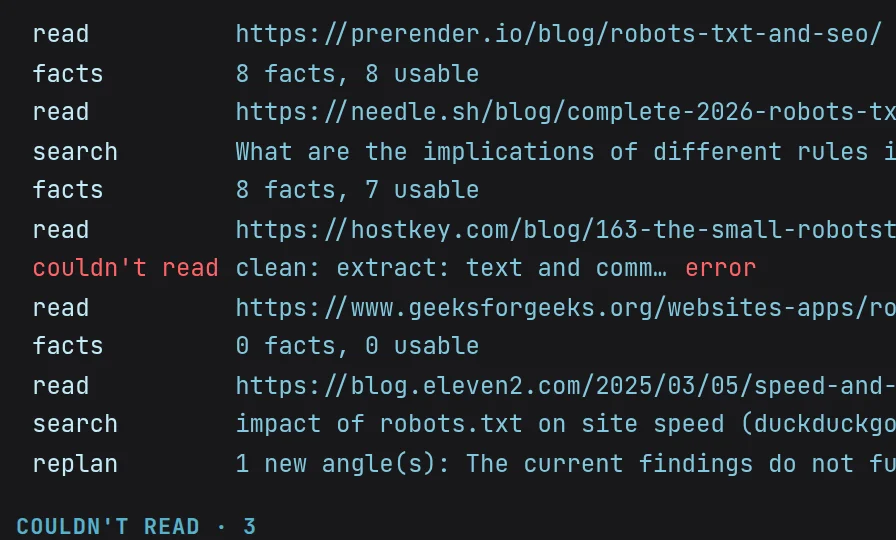
      • Ask a question and watch the run read pages and take facts as it goes.
      • Steer it mid-run, or stop it and have it write with what it has.
      The run’s live log mid-read: each page it read, the facts it took from it, and its next searches.
    • Core

      Scraping a watched page no longer hides its next change

      • Watch compares against its own last check, so a scrape or research read of the same URL can’t swallow a change.
      • A URL’s first scrape is a baseline, not a change.
  8. v0.1.24

    • Feature
    • Core

      A ledger for research claims

      • Research runs and their facts are stored, each fact tied to the exact page snapshot it cites, so a claim can’t point at a page that wasn’t kept.
      • Any stored version of a page can be read back by the moment it was captured.
Older releases
  1. v0.1.23

    • Feature
    • Performance
    • Desktop

      Several formats from one fetch

      • Pick markdown, JSON and HTML together: one Run fetches the page once, and each format gets its own tab.
    • Core

      Formats render from the cleaned page

      • A scrape keeps its cleaned page, so every other format renders from it without another fetch.
    • Desktop

      Search scrapes its top hits

      • Search can fetch the first 3, 5 or 10 results in the same call; each page opens under its card.
    • Desktop

      Keys in your OS keyring

      • Search-engine and site-extractor keys live in the OS keyring, or sealed in a local file where there isn’t one — never in plain text.
      • Settings → Keys shows where each value comes from, and the MCP server can require a bearer token.
    • Desktop

      A light theme

      • A sun and moon toggle in the header switches the app between dark and light.
  2. v0.1.22

    • Feature
    • Fix
    • Desktop

      Signed webhooks

      • Settings → Webhooks registers up to 10 endpoints for watch changes and finished or failed crawls.
      • Every delivery is signed to the Standard Webhooks spec and retried with backoff under one webhook id.
    • Core

      Draft a schema from a sentence

      • Describe the fields in plain words and the engine drafts a JSON Schema, repairing its own output up to three times.
    • Core

      Watch changes count words and links

      • Each change reports its net word change and which link targets were added or removed.
    • Core

      Prompt runs log what they cost

      • Summarize and the MCP prompt tools logged $0 for OpenAI and Anthropic; they log real spend now, so budgets see it.
      • OpenAI’s strict structured outputs are used only for schemas strict mode accepts, and any other schema is still validated and repaired.
  3. v0.1.21

    • Feature
    • Fix
    • Desktop

      Failures, grouped by reason

      • Overview’s Failures card groups this week’s failed runs — challenge, quality, timeout, robots, network, other — each with a one-click remedy.
    • Core

      Failed runs record why

      • A failed run stores its kind and the error word for word, and scrape errors carry their run id.
    • Desktop

      A live crawl feed

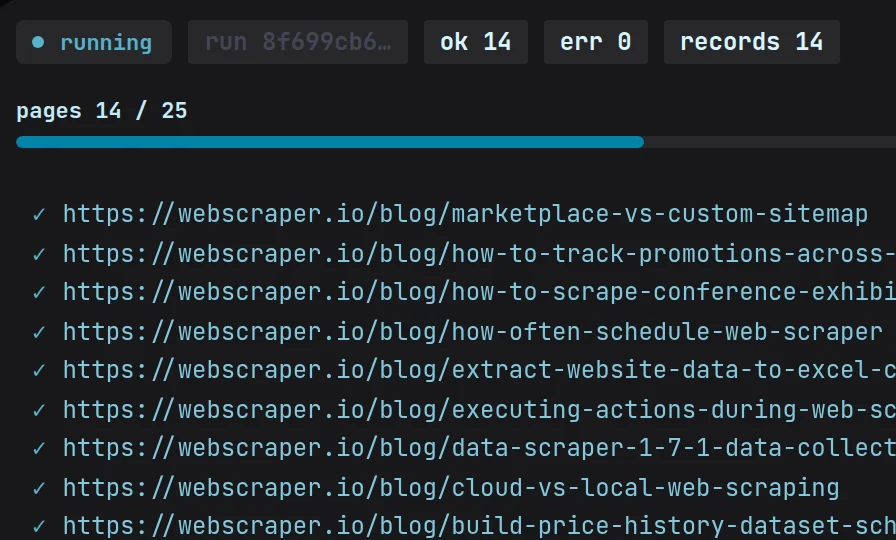
      • The run panel streams the last 20 pages as they land, each ticked or crossed out with its reason.
      The crawl running at 14 of 25 pages with no errors, each webscraper.io blog post ticked off as it lands.
    • Desktop

      Watching in the background

      • Close the window and watches keep running from the tray. A scheduled change raises an OS notification that opens it.
    • Desktop

      A schema library

      • Describe what you want from a page and the LLM drafts a schema fitted to it. Edit it, then save it to the library for next time.
    • Desktop

      Summarize works again

      • Summarize and the in-app MCP prompt tools had failed since the spend budget landed. They run again, inside the budget.
  4. v0.1.20

    • Feature
    • Desktop

      Activity and spend

      • Overview charts runs per day and where the spend went, by provider, with this month’s total.
      • Set a monthly budget, and every LLM call checks it first.
    • Desktop

      Overview is the launch screen

      • The app opens on Overview.
    • Core

      Activity and spend by provider

      • The store totals runs per day and spend per provider itself, indexed by time.
  5. v0.1.19

    • Feature
    • Desktop

      Overview, rebuilt

      • Action cards for what to do next, a pulse of your watches, your saved sessions, and a Connect an agent card.
      • A dismissed card stays dismissed, and the MCP setup is remembered.
    • Core

      Agent configs written for you

      • The engine writes an MCP client’s config itself, so connecting an agent is one step.
  6. v0.1.18

    • Feature
    • Desktop

      Copy as…

      • Every run copies as a CLI command, an MCP call or Go code, with secrets written as environment-variable names.
    • Desktop

      A cost hint beside Run

      • Before an LLM run or a crawl, Magpie shows what it expects it to cost and how much work it is.
    • Desktop

      Replay any run

      • History’s Output tab shows a scrape’s markdown and extracted data or a crawl’s records, and Reproduce runs a scrape again as it was.
      • Recent runs sit under the Scrape and Crawl forms.
    • Desktop

      Settings in full, and a command palette

      • Settings covers every option, a command palette reaches any screen, and History gains filters.
      • The sidebar groups its screens and collapses.
    • Core

      Site extractors that take a key

      • Extractors for API-first sites can take a credential, and the selector cache can be inspected per domain.
  7. v0.1.17

    • Feature
    • Fix
    • Desktop

      Watch

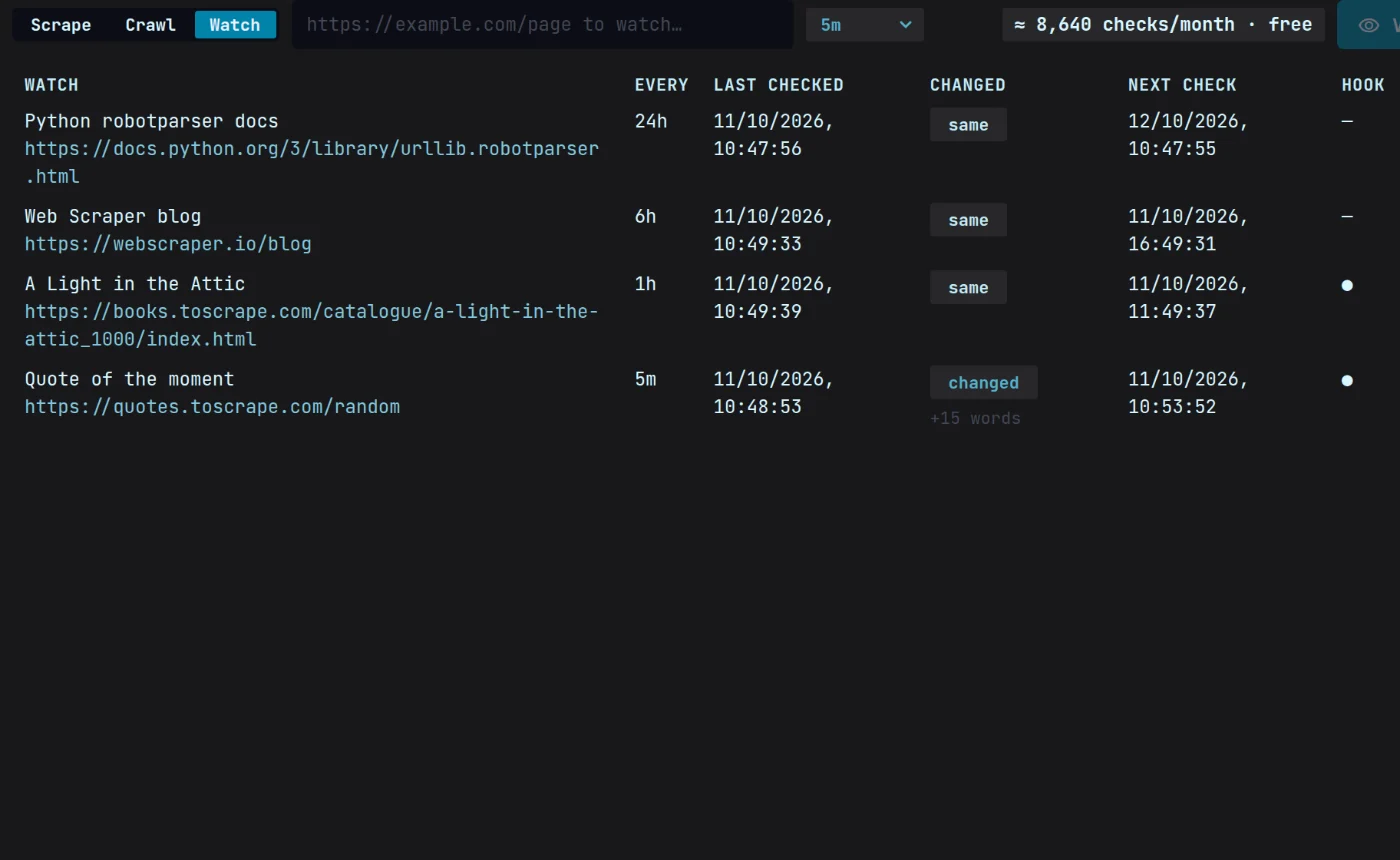
      • Add a URL and a schedule; Magpie checks it on time and keeps every snapshot.
      Four Magpie watches and their schedules — Python docs every 24 hours, a blog every 6, a book’s page every hour, a quote page every 5 minutes — with when each was last checked, whether it changed and the next check.
    • Desktop

      Search and Compare

      • Search the web from the app and send any result straight to Scrape.
      • Compare puts two snapshots of a page side by side, removals in red and additions in green.
    • Desktop

      Linux: the taskbar icon shows every time

      • The icon is set on the main thread after startup, which ends a race that left it blank.
    • Core

      Snapshot history

      • A URL’s stored snapshots can be listed, newest first.
  8. v0.1.16

    • Feature
    • Desktop

      Summarize, Re-extract and Brand

      • Summarize condenses a result without fetching it again, and Re-extract runs a schema over the page you already have.
      • Brand lists a page’s colours, fonts, logo and favicon, no LLM involved.
    • Desktop

      A proxy per run

      • Scrape and Crawl each take a proxy for one run, checked before anything is fetched.
    • Core

      Summarize text you already have

      • SummarizeText summarizes without a fetch.
  9. v0.1.15

    • Feature
    • Fix
    • Desktop

      Sessions that notice when they expire

      • An expired login shows a banner with Re-login, and the sessions list shows each one’s status.
      • Capture now saves the login you’re looking at.
    • Core

      The browser sends your headers and cookies

      • Browser-rendered pages dropped a run’s headers and cookies; they carry them now.
  10. v0.1.14

    • Feature
    • Core

      magpie init

      • One command sets up Magpie’s agent skill for your coding agent.
    • Core

      Six more site extractors

      • Six host and product extractors take the registry from 21 to 27.
    • Core

      Headers reach the browser

      • A run’s request headers are sent on browser-rendered pages too.
    • Core

      An offline quality benchmark

      • A harness scores extraction quality against saved pages, with no network.
  11. v0.1.13

    • Feature
    • Fix
    • Performance
    • Desktop

      Sessions: scrape behind your login

      • Log in once in a browser window. Magpie seals the session and attaches it only to the host it came from.
    • Desktop

      Export and resume crawls

      • A crawl’s records save as JSONL you can export, preview and open, and History can resume or re-run it.
    • Core

      Selectors heal without an LLM

      • When a cached selector stops matching, the engine finds the element again by its fingerprint before asking an LLM.
    • Core

      Local files stay off the browser

      • A file:// page is never escalated to browser rendering.
  12. v0.1.12

    • Fix
    • Core

      OpenAI-style routes left alone

      • The /v1 join is scoped to the Anthropic messages route; OpenAI wire paths are untouched.
  13. v0.1.11

    • Fix
    • Core

      Messages-routed models work again

      • A tolerant /v1 endpoint join fixes OpenCode Zen models that route through the messages API.
  14. v0.1.10

    • Fix
    • Core

      robots.txt goes through your proxy

      • A crawl reads robots.txt through the run’s proxy, like every other request.
  15. v0.1.9

    • Fix
    • Core

      Per-run proxies pass the address guard

      • The private-address guard trusts the proxy you set for a run.
      • Saving the config refuses a file that holds only comments.
  16. v0.1.8

    • Feature
    • Core

      A proxy per run

      • Fetch, scrape and crawl each take a proxy for one run, over the configured pool.
  17. v0.1.7

    • Feature
    • Core

      Cookies on the browser path

      • A run’s cookies are set in the browser before the page loads — the groundwork for saved logins.
  18. v0.1.6

    • Feature
    • Core

      Headers per run

      • A scrape or fetch can carry its own request headers.
  19. v0.1.5

    • Fix
    • Core

      Config saves keep your comments

      • Saving round-trips the config file, keeping comments and keys the engine doesn’t know.
  20. v0.1.4

    • Feature
    • Fix
    • Desktop

      Keys, saved and tested

      • Settings saves provider keys to the OS keyring, tests them, and clears the cache.
    • Desktop

      Every scrape option in the app

      • Stealth, CSS include and exclude, a per-run LLM and key, a format picker and a pasted schema.
      • A blocked page shows a plain warning with a retry in browser render.
    • Desktop

      Pick the provider from the footer

      • The footer’s provider badge is a picker, and your default provider and model are saved.
    • Desktop

      Open folder opens the folder

      • The app opens it itself; the webview never could.
    • Core

      Clearing the selector cache clears all of it

      • Clearing with no filter removes every cached selector.
  21. v0.1.3

    • Feature
    • Fix
    • Core

      Extractors for common page types

      • Job posts, events, local businesses, articles and RSS are read from their structured data with no LLM, plus an Upwork job extractor.
    • Core

      Extractors survive a blocked page

      • A site extractor survives a blocked main page and escalates its own fetches, and a challenge that outlasts the browser is reported by type.
  22. v0.1.2

    • Feature
    • Desktop

      Scrape, Crawl, History and Settings

      • The app’s first screens, on the Magpie design system, in a native window on every platform.
      • Site extractors and site maps reach the app.
    • Core

      One list of LLM providers

      • Every surface builds its extractor from the same provider list, so the app and the CLI can’t disagree.
  23. v0.1.1

    • Feature
    • Desktop

      Scrape, crawl and history in the app

      • The app runs scrapes and crawls on the engine, with live crawl progress, a Stop button and a run history.
    • Core

      Extractors can be registered from outside

      • An app that embeds the engine can register its own site extractors.
  24. v0.1.0

    • Feature
    • Core

      The first tagged engine

      • Scrape a page to clean markdown, crawl whole sites and extract typed data with your own LLM keys — from the CLI or as an MCP server.
      • TLS impersonation, a browser path for JavaScript pages, PDF text, proxy pools and a private-address guard are built in.
      • magpie watch checks a page for changes, and crawl --corpus writes {url, title, depth, markdown} JSONL with no LLM key.
    • Desktop

      The desktop app’s first build

      • A native window around the same engine, sharing its store with the CLI.

Stop renting credits.

One flat price, your machine, your keys.

Download free for Windows, macOS and Linux

Windows · macOS · Linux $49/mo flat, cancel anytime